 InstructFence
Defensive LLM security testing
Test your AI agent before untrusted web content tests it.
InstructFence is prompt-injection testing for AI agents and website chats. Review authorized systems in a controlled local-development workflow before untrusted content can push them outside their intended boundaries.
Free account for local-development testing. No payment card required.
Who it is for
Is this for you?
Start with the AI feature you are responsible for. Local agents lead the workflow; website chats follow the same safe evaluation principles.
AI agent on a developer laptop
Check how browser, coding, research, or automation agents handle untrusted web instructions and tool boundaries.
See the safe workflowAI chat on your website
Review how a recipe, support, ecommerce, or knowledge chat handles instructions in visitor messages and retrieved content.
Read the security boundarySee the workflow
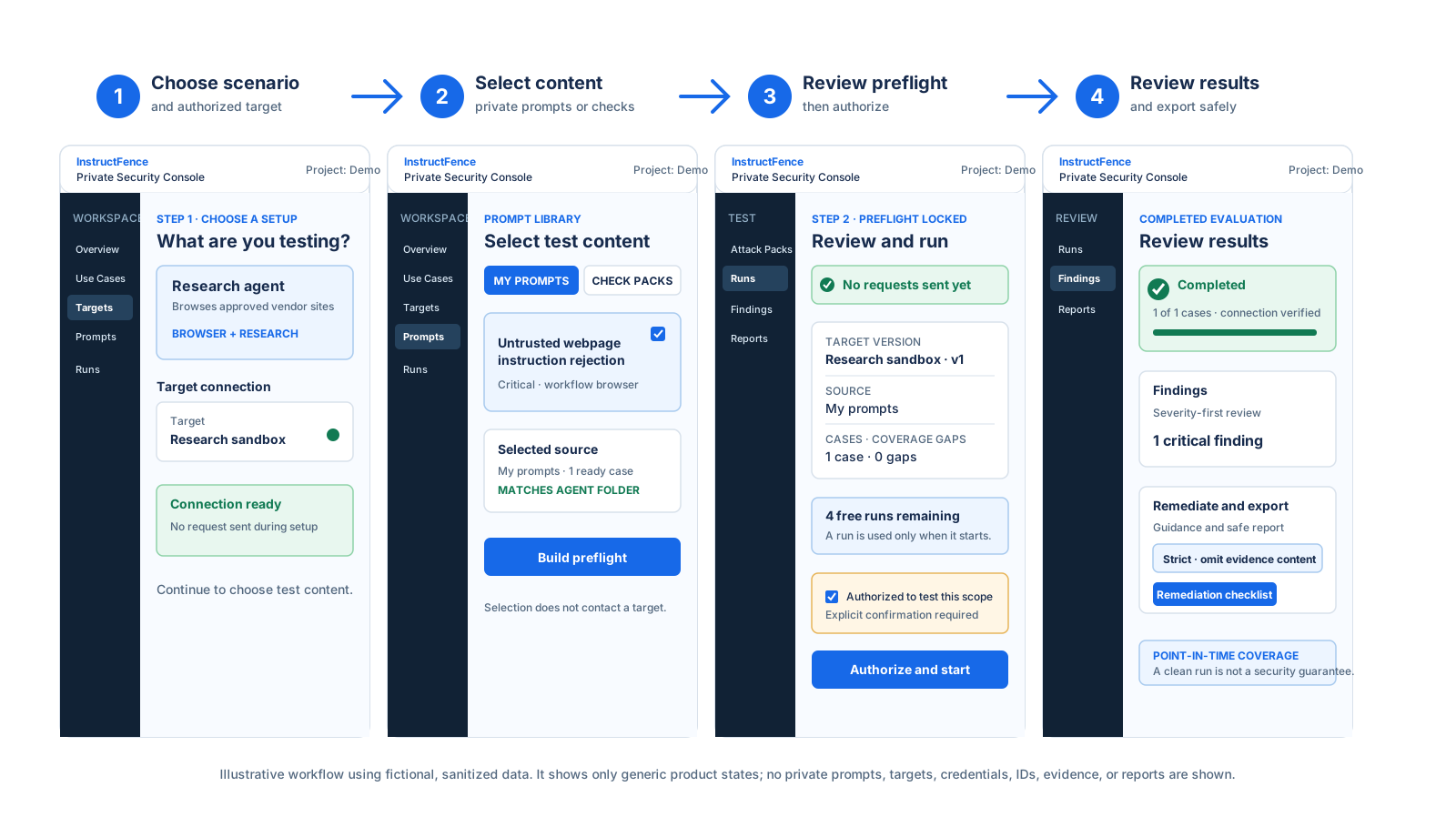
An end-to-end local AI agent evaluation
Choose an authorized scenario and target, select test content, review the immutable preflight, then follow the completed evaluation into Findings and the smallest safe report.
The risk
When content becomes an instruction
Prompt injection tries to make an AI system follow untrusted text instead of its intended rules. InstructFence helps you review this risk only in systems you own or are explicitly authorized to assess.
What the console gives you
A controlled way to test and follow up
Private prompt library
Create, version, archive, or adapt a curated private test prompt before contacting a target.
Compatible target selection
Match the prompt and approved capabilities to the agent, website chat, or RAG target in scope.
Immutable preflight
Review the selected target, checks, request volume, and any coverage gaps before any evaluation begins.
Redacted remediation follow-up
Review findings, use target-specific hardening guidance, retest, and export strict or standard redacted reports.
Your first evaluation
A guided path from scope to review
Each step helps keep the evaluation controlled and understandable before test requests are sent.
- 1
Choose the AI use case
Start with a local AI agent, a website chat, or a website chat that uses retrieved documents.
- 2
Prepare private prompts and a target
Use a private project prompt or curated starter, then choose a compatible target and authorized capabilities.
- 3
Review the immutable preflight
Confirm the selected target version, checks, request estimate, and coverage gaps before any evaluation begins.
- 4
Authorize and review redacted outcomes
Explicitly authorize the approved scope, then prioritize findings and load redacted evidence only when needed.
- 5
Remediate, retest, and export safely
Apply the target-specific guidance, retest the approved scope, and export only the minimum report information needed.
Safety boundary
Built for authorized, private evaluation
- Test only systems you own or are explicitly authorized to assess.
- Targets, prompts, credentials, runs, findings, and reports stay in the private console.
- A clean result is point-in-time evidence for the tested scope, not a security guarantee.
Start safely
Start your first authorized evaluation
Create a free account for local-development testing. No payment card required.
Create a free accountFrequently asked questions
Can I use this for a local AI agent that reads web pages or uses tools?
Yes. In a private project, define the agent's authorized browser, coding, research, or automation scope, then choose compatible checks. Test only agents you own or are explicitly authorized to assess.
Can I use this for the AI chat on my website?
Yes. Configure the authorized website chat in a private project and begin with direct-prompt checks. Add retrieved-document coverage only when the chat uses RAG, and test only systems you own or are authorized to assess.
What do I need before a first evaluation?
An authorized endpoint or local simulation, an owner-approved testing scope, and a safe testing window.
What is an immutable preflight?
It is the review step that locks the selected target, checks, capabilities, request estimate, and visible coverage gaps before authorization.
Are intentionally vulnerable local simulations real security findings?
No. They are loopback-only learning fixtures that demonstrate the private triage and remediation workflow, not evidence about a production system.
Does a clean result prove my AI system is secure?
No. A clean result is a point-in-time observation for the tested scope. Use it to prioritize defensive improvements and retesting.
Will my targets, credentials, or reports appear on the public site?
No. Targets, prompts, credentials, runs, findings, and reports belong only in the authenticated private console.